
Spectacled works with any CalDAV server, but servers differ in the details. This is the first in a series of posts documenting which servers we have tested, what worked, and the settings worth checking before you add an account. We’re starting with Baïkal.
What Baïkal is
Baïkal is a small, self-hosted CalDAV and CardDAV server written in PHP and built on the sabre/dav library. It stores its data in SQLite or MySQL, runs happily on shared hosting, a NAS or a Raspberry Pi, and comes with a minimal web admin for managing users and collections. If you want your own CalDAV server without running a full groupware suite, Baïkal is one of the smallest ways to get there.
The short version: it works
We tested all three apps – spectacled Journals, spectacled Notes and spectacled Tasks – against Baïkal 0.11.1. Account setup and discovery, creating and deleting collections, and creating, editing, moving and deleting entries all behaved as expected. No sync errors, no lost data, no server-side quirks to work around.
| App | Status | Notes |
|---|---|---|
| spectacled Journals | ✅ Works | No issues found |
| spectacled Notes | ✅ Works | No issues found |
| spectacled Tasks | ✅ Works | No issues found |
The one thing to check first: Basic, not Digest
Spectacled authenticates with HTTP Basic only. Baïkal can be configured for either Digest or Basic authentication, and if your instance is set to Digest, the apps cannot log in – you will simply get a failed login even though your credentials are correct.
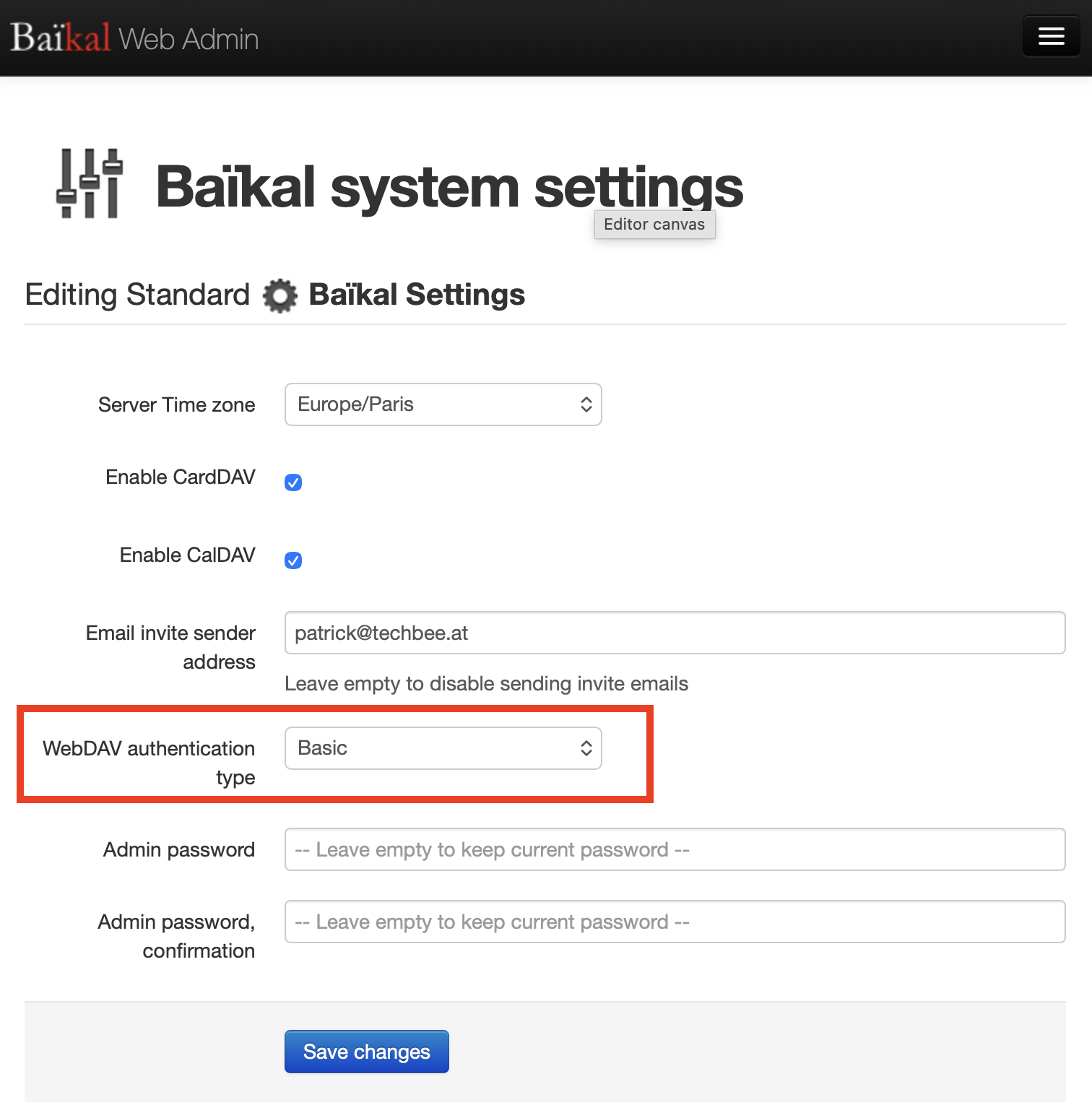
So before you add the account, switch Baïkal to Basic authentication.
The authentication type is a server-wide Baïkal setting, not a per-user one. Open the Baïkal admin web interface, go to System Settings, and set the WebDAV authentication type to Basic. Existing accounts and passwords keep working; only the way clients prove them changes.
Serve Baïkal over HTTPS. Basic authentication sends your username and password Base64-encoded – that is encoding, not encryption, so anyone who can read the traffic can read the credentials. Avoiding exactly that on plain HTTP is what Digest was designed for. With TLS in front, Basic is the standard way CalDAV clients authenticate, and it is what most other clients use as well.
If you are on hosting where you cannot change this setting, spectacled will not be able to connect for now – Digest support is not implemented in the apps.
Connecting your account
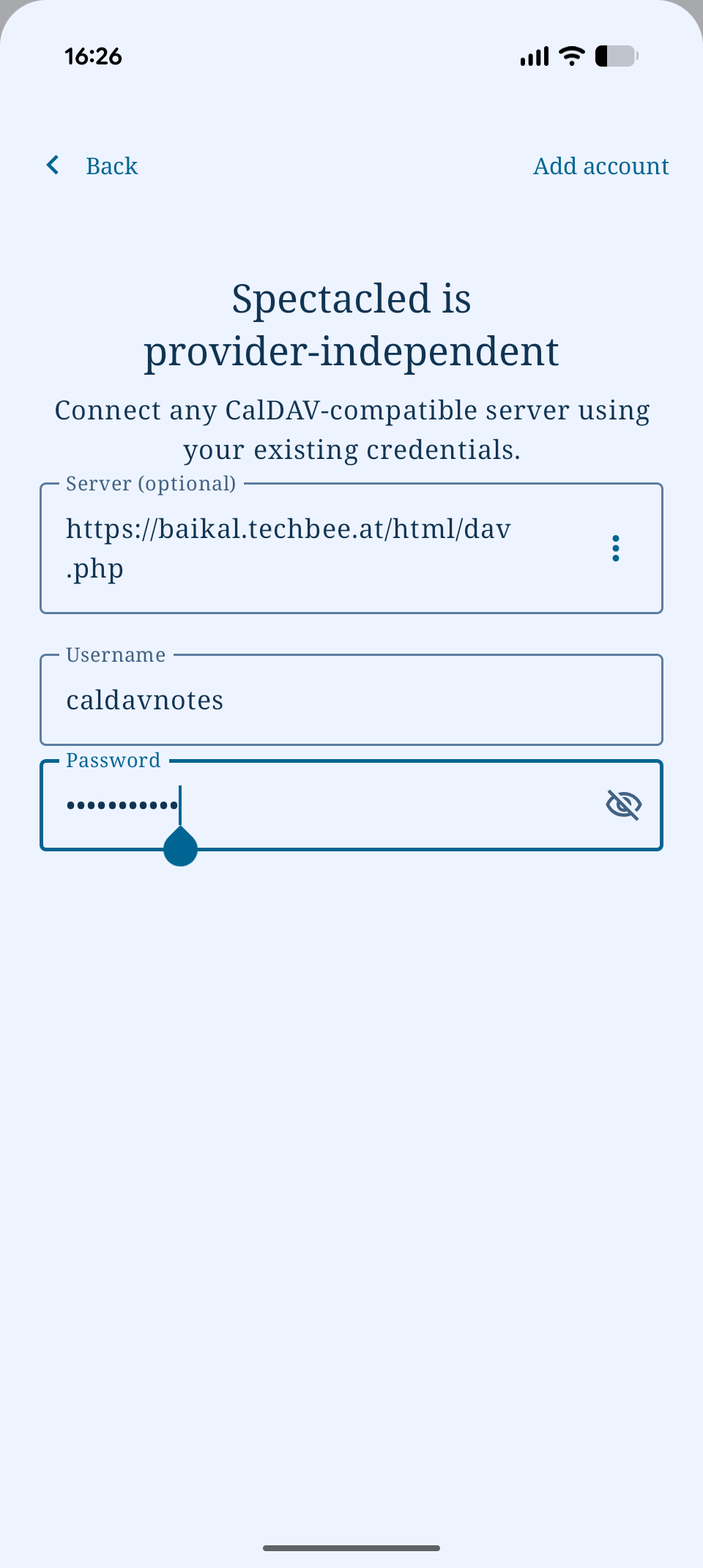
In the app, add an account and enter your Baïkal CalDAV URL together with your Baïkal username and password. The URL is usually the dav.php endpoint, for example https://dav.example.com/dav.php/; Baïkal shows the exact address for each user in its admin interface. Spectacled also retries via /.well-known/caldav, so the bare host name works too if your web server has Baïkal’s well-known redirect in place.
After login, spectacled lists the collections it can actually use. Journals and Notes store their entries as VJOURNAL, Tasks uses VTODO – so a collection only appears if it supports one of those components. A calendar created for events only will not show up. The quickest route is to let spectacled create a new collection for you during setup: it requests the right component set itself.
A note for web app users
The browser version is a special case, and it is not Baïkal’s fault: browsers enforce CORS, and CalDAV servers generally do not send the headers a browser needs for cross-origin WebDAV requests. The web app therefore talks to your server through a small CORS proxy, which you should self-host – it terminates TLS and would otherwise let a third party see your credentials. The Android, iOS and desktop apps contact Baïkal directly and need none of this.
Verdict
Baïkal is a good match for spectacled: light to run, standards-compliant, and it worked with all three apps without a single workaround. Set the authentication type to Basic, put it behind HTTPS, and you are done.
Tested spectacled against a server we haven’t covered yet? Let us know – reports from users are how this series grows.
Leave a Reply